
What Have I Done?
This is a question we must all ask ourselves from time to time, and this is the page where I'm recording my answers.
Table of Contents
- Townchest (May 2024 - January 2026)
- Lessons at HacKSU (Spring 2023 - Spring 2024)
- Small Static Sites (Ongoing)
- libsrcml.js (Fall 2023)
- Research Folder (Spring 2023 - Summer 2023)
- Bundle.md (November 2022)
- Singlehanded Typing (October 2022)
- Perspective Editor (July 2022)
- Mitchbot Streams (Summer 2021)
- Multiplayer NYT Spelling Bee (November 2021 - July 2022)
- Catullus (October 2021)
- Minecraft Map Collage (June 2021)
- Twitter Archive Browser (January - March 2021)
- Remote Group Presentation Synchronization (April 2020)
- Sweet.sh (Spring 2019 - Summer 2019)
- This Website (August 2022 - Ongoing)

This page documents a few things I’ve worked on over the years.
Some highlights:
- My last job was working on Townchest, an online marketplace and fundraising platform being developed by Enbasis Inc.
- At Kent State University, I was president of HacKSU.
- A Discord bot I built to play the New York Times Spelling Bee with friends has been used by hundreds of people.
- A long time ago, I helped out with an experimental social network called Sweet.sh.
May 2024 - January 2026
• Live VersionTownchest

Townchest is an online shopping platform being developed by the venture-backed startup Enbasis, Inc. It works like this: community groups and nonprofits create fundraisers on Townchest; people who want to support those groups make purchases; and some of the money from those purchases goes back to the groups that created the fundraisers. I joined the project shortly after it received Series A funding in spring 2024, and became the first full-time, full-stack developer to be tasked with consolidating the raw materials that had been created for early demos into a fully-functional online marketplace and fundraising platform.
Working on Townchest was a journey. On the frontend, I created new versions of critical parts of the site, like a Stripe-based checkout page, a streamlined onboarding flow for adding groups to the platform, and a modern product search page with sorting and filtering; on the backend, I restructured our code and took it from the somewhat ad-hoc approach that had been used during initial exploratory development towards a modular monolith that broke the business logic of groups and fundraisers down into encapsulated services.
Developing a new product at a startup is a process of constant re-imagining and exploration. Over the course of the project, we’ve worked on integrations with four different online e-commerce platforms, including Shopify; I started and led the implementation and integration of the one that has become our core e-commerce engine, Vendure, to which I became a small contributor. I also ended up creating a fork of the Supabase CLI to address an issue we were having with it and eventually contributing the final fix for the issue myself, despite not knowing Go at the time. I also gained and leveraged knowledge of Vercel, AWS (S3, ECS, RDS, Route 53, and API Gateway), Docker, Next.js, MUI, Storybook, Payload CMS, TanStack Query, GraphQL, and OAuth.
Spring 2023 - Spring 2024
• Official WebsiteLessons at HacKSU

Over the course of three semesters, I gave lessons on coding at HacKSU, Kent State University’s premier computer science student organization.
I’ve always enjoyed creative writing that takes practical, technical subjects that could easily be boring to read about and makes them oddly enthralling - writing like Joel Spolsky’s old blog about software, or Matt Levine’s finance column, Money Stuff. I tried to do the same thing during my time at HacKSU, where I was the official “lesson master” during my first semester before becoming the club president for the next two.
HacKSU ended up defining my experience at Kent State to a significant degree, and presented a lot of interesting challenges: I ended up being in charge of reconstituting the club’s leadership from scratch at the beginning of the 2023-2024 academic year, and hopefully guided it towards being a hub for both technical meetings of the minds and social activity in the computer science department for the first time since the pandemic started. We covered a wide range of important programming ideas, and stayed late and talked with a number of interesting visitors from the software industry.
I started by putting a lot of work into the lessons that I gave, though. Occasionally building on examples created by earlier leaders, I carefully wrote out my thoughts on basic HTML, CSS, and JavaScript, Python, SQLite, Express, MongoDB, React, Vue, Flutter, and the fossil record of computer science, eventually hammering out a little over 30,000 words (about the same length as Ernest Hemingway’s The Old Man and the Sea) - plus about 2,500 more for the guide to hackathons that I wrote when we organized a hackathon. The format of these lessons is typically a fairly basic, gentle introduction, but I enjoyed using language to illuminate and sometimes re-derive the things that programmers take for granted in the technology stacks we use.
Ongoing
• Github • Val.TownSmall Static Sites


Here are a few smaller apps I’ve put up that I think are fun:
- Nine Houses Quiz: This is an interactive Svelte version of a quiz created by the author of the popular Locked Tomb book series. I shared it on social media and it has been taken well over a thousand times.
- Word Clock: This is a JavaScript port of an Apple II app that displays the time using words. I translated the original 6502 assembly to run on the modern web because emulated versions of the app tend to fall out of sync with the actual time. Bonus: here is a test page that renders every possible state of the clock.
- Patreon Comments Tracker: When a webcomic that I follow was going through a major new plot development, I built a scraper and a data table that could sort posts from Patreon by the number of comments and likes that they received to track the amount of activity that was being generated. This was used by the author for reference, since apparently not even he can could sort posts this way using Patreon’s tools. This uses the excellent serverless deployment platform val.town and no client-side JavaScript.
- Corn Simulator: This is a website that simulates the experience of eating an ear of corn one kernel at a time. I made the corn model in Blender and set it up like a simple game using three.js and WebGL. It seemed like a good idea at the time.
Fall 2023
• Live Versionlibsrcml.js

srcML is a well-known research project that aims to generate abstract syntax tree markup for code: it labels syntactic entities like classes, functions, and statements with XML in a uniform style across multiple languages. Its core is a C/C++ library, libsrcml, which contains a parser and a lot of utility functions for managing “units” (XML files) and “archives” (XML files that correspond to multiple source code files). A Python wrapper for the library already exists, which loads and calls compiled code using the ctypes module. I was tasked with bringing libsrcml to the JavaScript ecosystem by compiling it to WebAssembly and writing an idiomatic and object-oriented wrapper around it. This project required thinking across a wide range of levels of abstraction, from low-level C-style memory management to JSDoc types.
Although libsrcml is written with C++, its programmatic API consists of standalone C functions that operate on pointers to opaque structs. This is very different from the typical JavaScript library, where nested, transparent objects and first-class functions are ubiquitous; this gap had to be bridged with a very different design, where units and archives went from being opaque pointers to being dynamic objects that provide access to the original library’s functionality.
The build process also posed some challenges; although it is the industry standard and the most feature-complete C/C++ to WASM compiler I could find, I discovered that Emscripten was inconsistent about outputting CJS vs. ES modules, and leveraged tricks with dynamic imports that bundlers like Vite struggled to understand. I ended up using Docker to provide a portable environment for deterministically compiling libsrcml into WASM and carefully patching the emitted JavaScript “glue code.”
I then used my new library to build a new “playground” for srcML, where you can see code being parsed into XML documents by srcML live in your browser.
Spring 2023 - Summer 2023
• GithubResearch Folder

This is a simple web app for organizing research papers that I created while I was a research assistant in a distributed algorithms lab. I mean, it was simple, but I kept adding features to it.
This was built using Vue, Vite, Typescript, Express, and Remult. Using it, you can can fetch research papers using the Semantic Scholar API and display them in a table. You can also manually create and edit table entries. It can display the referenced research papers as embedded PDFs, and provides an integrated note-taking interface that allows you to “mention” other research papers in your notes, linking to them. You can also view them as a graph, with the edges provided by the “mentions” in your notes or the citations between papers. You can also position the papers within the graph according to their textual embeddings, using the SPECTER2 embeddings provided by Semantic Scholar. The embeddings are reduced to two dimensions using TSNE for display.
November 2022
• Github • Live VersionBundle.md

This project searches a repository for certain Markdown files and bundles them into a compact and readable depiction of your folder structure.
Tools for automatically generating API documentation from comments in code have existed forever, but what about documenting a project’s structure for developers? Faced with a large multi-application monorepo project, I created this tool so I could write structured documentation in each folder (by creating one or two Markdown files with meaningful names) and then have them compiled into a quick visual summary of the directory structure, with further docs written out below.
Then, I added some features that took advantage of Github as a platform: I created a Github Action for the program so that it could be automatically run as part of a CI/CD pipeline and added the option to have the result auto-published to a specific page on the project’s Github wiki. I also published the project to npm so it can be invoked in one npx command. I haven’t gone out of my way to promote it recently, but I still think this tool could be pretty useful for larger projects.
October 2022
• GithubSinglehanded Typing

This project allows you to reach all the letters of the alphabet while touch-typing with one hand.
At some point in mid-to-late 2022, I broke my left arm, which meant I briefly couldn’t use my left hand for typing. I looked for schemes to solve this problem, and the highest-potential one I could find was spelled out in an old XKCD blog post: “Mirrorboard, a one-handed keyboard layout for the lazy.” The basic idea was to create a hotkey that dynamically switched the letters from one side of the keyboard (the one corresponding to your broken/unusable hand) over to the side that’s under the hand that you could do stuff with.
This idea seemed so simple and helpful that I was shocked that I couldn’t find a widely usable implementation easily; the blog post only offered a configuration file that could have been used for XInput devices.
So, during the twenty-four hours of Kent State University’s 2022 hackathon, I implemented my own version of the idea, and made it available on the Internet. In practice, typing this way is surprisingly intuitive; it’s not instantly effortless, but your existing muscle memory actually helps you out a lot. Please feel free to try it out on its official site, where it’s implemented in-browser inside a practical text editor, with two tutorial modes and an accompanying executable for everyday use on Windows. The product won second place overall at the hackathon as a solo effort.
July 2022
• GithubPerspective Editor

I created an app that lets you place images in perspective in 3D space without actually needing 3D models and a 3D world.
This app was written in Dart using the Flutter framework for cross-platform app development, which makes it painless to build your code as static frontend code for the web or as a native app on desktop or mobile. Behind the scenes, it’s doing linear algebra, based on a breakdown of perspective transformation coefficient derivation that I found. In addition to creating images, it’s built to output JSON files with all the coefficients that are needed to open and use designs in this and other programs.
I created this app to help with my NYT Spelling Bee graphics project, for which I needed to position letters in 3D space to align them with elements in pre-existing image templates. I could have used the perspective warp tool in a program like PhotoShop to create this effect by hand, or with some work, I could have set up quadrilaterals in 3D space in the 3D modelling program Blender and used the built-in scripting capabilities and command line interface to prompt a slow and expensive render with image textures of letters placed where I wanted them to be, but I wanted a way to programmatically output this kind of scene that was appropriately simple and less fragile and wouldn’t drive me insane. This was the result.
Summer 2021
Mitchbot Streams

There are a few sites online that you can visit with your friends to watch Youtube videos in sync remotely, but most of them don’t have a ton of personality. To address that, I evolved Mitchbot Streams, which is a synchronized viewing app that supports Youtube, Vimeo, Dailymotion, and native HTML5 video embeds, keeps videos in sync using Websockets, has a chat feature that displays stylized versions of the avatars of the viewers in a “room” at the top of the page, and supports custom playlists.
The frontend is a mix of Vue and vanilla JS, and the backend API and websockets server is an Express app. It persists data to a SQLite database using the query builder library Knex, to which I became a very tiny contributor. Its visual style comprises an eclectic mix of stock photos from Unsplash, quite a few SVG/SMIL animations, and XP.css.
I created this app primarily for a single Discord server and received dozens of users from everywhere from Illinois to Japan. Its comprehensive features and unique style makes it one of my favorite things I’ve ever made and I’d love to put up a more powerful public version someday.
November 2021 - July 2022
• GithubMultiplayer NYT Spelling Bee

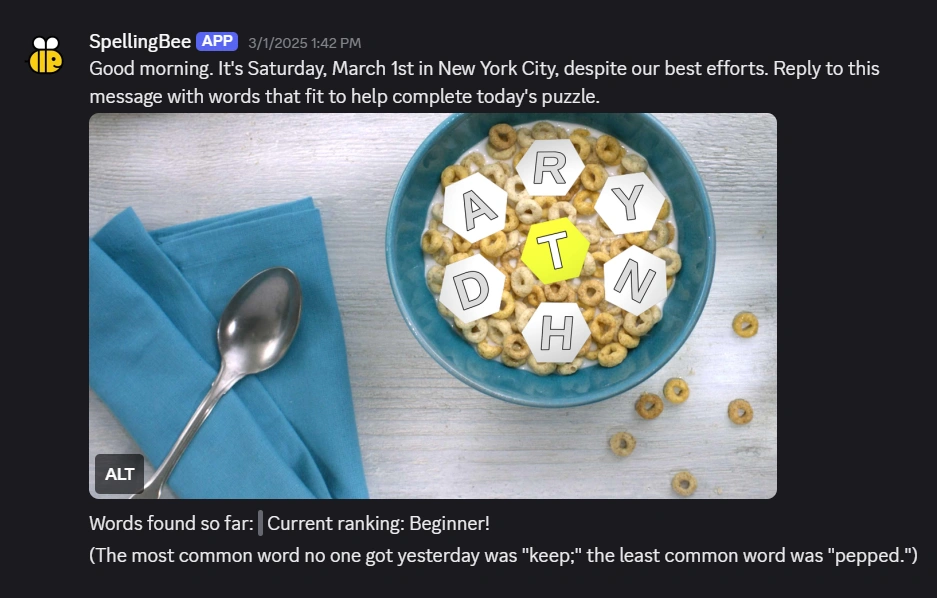

The New York Times’ Spelling Bee is a word game that a few people I know would post screenshots of and play collaboratively every day in their Discord server. I built a Discord bot that would automate the work of posting the puzzle each morning while also providing feedback and hints to make playing the game there more engaging. The result is a bot that currently runs in over 100 servers. I also created and published a Python library that makes creating and handling puzzle sessions easy.
I knew I wanted to create new graphics for the spelling bee puzzle; the basic task, which was to display seven letters in a way that emphasized one in particular, was open-ended and full of potential. Obviously, I had to make my designs programmatic. I ended up primarily either adding the letters to SVG files and rendering the results with the CairoSVG library, or consuming the JSON output of my 2.5D graphics app and using it to render a 3D image with the Python Imaging Library.
I also used C and Cython to create a Python module for this project that could efficiently store and load a trie that stored the set of all English words on Wiktionary, so that I could efficiently search for words that might exist according to some, and fit the puzzle’s criteria, but that weren’t officially considered puzzle answers.
!["Catullus, it’s too bad, but don’t be silly/you see it’s gone; well, gone is gone, that’s all" in normal text. "[A deep shuddering inhale] My new thing is infinite resignation./I’m extremely reserved now, and just, I hold everything loosely" in text that's fading as it gets further from the mouse cursor.](/_astro/catullus.PyQDKMk2_ZPkD6X.webp)
After stumbling across Frank O. Copley’s modernist translation of the ancient Roman poet Catullus and then Daniel Lavery’s contemporary take, I wanted to display them in contrast with each other, and ended up spending hours poring over fonts in order to create a showcase.
The result is a simple site created with Vue 3, using TypeScript and the Composition API. Although I wasn’t going for this at the time, the result is something like the ubiquitous Unix patch format, with lines that correspond displayed subsequent to each other so that you can see the changes. Some details I ended up poring over: the font sizes are carefully adjusted with variables in SCSS to keep everything visually at one scale, and the line heights are carefully specified to prevent layout shift when switching fonts.
June 2021
• GithubMinecraft Map Collage

I made a website that stitches together maps generated in the video game Minecraft and displays them with various labeled points of interest.
This is another app scaffolded and built with the Vue CLI, written in TypeScript and with some components that use TSX and render functions. It uses the RBush library to spatially index the map elements and the Bezier.js library to help create SVG curves. The data used by the frontend is built by a small Python program that includes a module written in the Cython extension language in order to process binary data from the Minecraft files at very high speeds. This was a surprisingly math- and data-heavy project.
Details on the requisite geometry:
There already exists a lot of software that generates maps from Minecraft worlds, but I didn’t want this program to generate new maps - I wanted to extract and display the ones that I had organically created in-game. These maps consisted of various static images that portrayed a world at very different levels of detail, so I needed to separate the map areas that were mapped out at the higher level of detail and thus could be zoomed in on from those that weren’t. To do this, I grouped adjacent maps at similar levels of detail into “islands” and displayed the available islands as part of the “zoom in” interaction.
The more interesting problem was stopping users from panning away from a high-detail island and into low-detail territory while they were zoomed in. To do this, the build step generates data for polygons that enclose all the maps of each island and the front end treats the sides of these as collision bounds that interact with an imaginary point at the center of the user’s screen, with the goal of keeping this point from escaping the current island (except when “cutting across” a concave corner; the polygons are altered to leave room for that.) To do this, I perform a simple point-in-polygon test to see if a user’s interaction kept the center-of-the-screen point inside the polygon and, if not, I find the closest point on the polygon to the one the user was aiming towards and move the map so that the screen is centered on that. (This method of projecting the collision point back onto the polygon means that the component of its movement vector that wasn’t responsible for trying to leave the polygon is preserved (i.e. if you try to pan the map diagonally off an island you will slide along its edge instead of just stopping.))

I also wanted to display organically curved paths on the map that went from point to point without having to manually draw them. To do this, I connected the points with imaginary line segments, calculated the slopes of the tangents of the corners where those line segments meet, and created Bezier curves that had the same slopes at the same points but interpolated them smoothly in between.

January - March 2021
• GithubTwitter Archive Browser

This project exists thanks to a friend who’d spent years participating in numerous large Twitter group chats, totalling well over a million messages, but, at the time, had no way to archive or browse them. She could get Twitter to export her data as a huge ZIP folder, but all the actual messages in it were buried in arrays declared in various .js files (not even JSON 🤨). I decided that there should be a way to use those messages exactly as if they were from an old Discord server, with user profiles (including notes and nicknames), full-text search, and bi-directional infinite scrolling, and so I created a Python backend and a React frontend that extracted the messages from the archive data and displayed them thusly.
There are a few minor regrets that I have about this project: most obviously, the UI is very functional, but that’s pretty much all it is. It has some cool features, like the ability to jump around freely within the stream of messages with searches, date picking, and shareable links, but I didn’t quite know how to land on a vision for a UI’s aesthetic yet. Also, the backend is built around a step where all the messages are packed into a normalized SQLite database, which is cool but probably unnecessary since they’re already pretty normalized in a way that a NoSQL database would be suited to, and I used Tornado as the Python HTTP server library just because I was already familiar with it, instead of learning something more relevant like FastAPI.
Overall, though, I’m happy with this as a comprehensive full-stack project that I started myself, finished myself, and kept at a high standard of quality throughout. The backend has a full suite of tests. The API has detailed documentation. The calls from the frontend to the backend are cleanly organized, and I even managed to get Redux to be helpful. This was also the first meaningful project I finished that used React, which has stubbornly stuck around as a continuously relevant skill.
April 2020
• GithubRemote Group Presentation Synchronization

This program just synchronizes a slide show between multiple people who view it through a website, letting each of them control the “next slide” and “previous slide” controls as well as giving each of them a laser pointer.
At the beginning of the pandemic, during the Spring 2020 semester, when all my classes went online, we who were in them were stuck giving group presentations remotely, which meant constantly saying “next slide, please” to the one person who was actually sharing their screen. I built this app out of simple static JavaScript and HTML, with a Python backend that used WebSockets (via the Socket.IO library) to make group control of a presentation seamless. My group members connected to my server application (I was using my home IP address and port forwarding to use my regular computer as a server at that time) and it synchronized the presentation state while giving all of us control.
It worked! This was one of my first legitimately practical independent programming projects, and is still some of the most straightforwardly effective problem-solving my programming skillset has allowed me to do.

sweet.sh was an experimental social network that got hundreds of signups from people on my corner of the Internet in 2019 and 2020. It was a project started by a guy I met there named Raphael Kabo, who was writing about utopias at the time for his PhD thesis. In accordance with this, he created a social network with innovative features, such as groups where the members voted on things like the group name and description or the public visibility of posts or the ability of people to join without approval.
When I initially found this project, I had no idea that a solo developer (or a small team) could create something this ambitious and useful in their spare time. I had never used Node.js, MongoDB, Webpack, or any of the other ubiquitous tools of independent full-stack web development before. This project became the main focus of my life outside of school in the spring and summer of 2019, and I’ve been feeling its impact ever since. I worked a lot on managing the database schema and migrations on the backend and on the rich-text-and-images content authoring tool on the frontend.
August 2022 - Ongoing
• Github • Live Version (do you really need this link?)This Website

This site is created and statically generated with Astro. It uses Astro’s content and framework integrations to integrate posts written in Markdown and Vue components. It is styled with Tailwind CSS. It uses this typewriter model for the “blog” graphic. The design for the logo on the front page was created by my friend Hannah.